
Installing OpenSWOS
From nothing to playing, one step at a time. It takes about five minutes.
1What you need
Your own copy of Sensible World of Soccer 96/97. OpenSWOS is a new engine for the game, but the game's graphics, music, sound and teams are still owned by their makers, so they can't come with OpenSWOS. The setup makes them from your copy instead. Nothing is downloaded.
Any one of these is enough to play:
| Your copy | Where to get it |
|---|---|
| The PC version (easiest) | Buy it on GOG and install it. The PC CD version works too. |
| The Amiga version | Disk images (.adf files) of your two SWOS 96/97 floppies. |
Have both? Use both: you get the Amiga's music, sound and loading screens as well as the PC's commentary. The real Amiga version of OpenSWOS needs both.
Two extras are optional, for players who have them: the Atari Jaguar cartridge image (for the Jaguar's sprites) and a SWOS 2020 install (for its pitches).
2Download
Get OpenSWOS from baker76.itch.io/openswos. That page and openswos.net are the only official places to get it: OpenSWOS is free, and never asks you to pay or sign up anywhere else. Pick the file for your computer:
| Your computer | Download |
|---|---|
| Windows (10 or later) | SWOS-Setup.exe, the installer |
| Mac (Apple silicon or Intel) | SWOS-macOS-app.zip |
| Linux (PC or Raspberry Pi) | SWOS-portable.zip, and OpenSWOS-Setup.zip for the setup window |
| Amiga (A1200/A4000 or an emulator) | SWOS-Amiga.zip, and OpenSWOS-Setup.zip to run on a PC or Mac |
3Install the game
Windows
- Run
SWOS-Setup.exe.- If Windows says "Windows protected your PC", click More info, then Run anyway. OpenSWOS isn't signed by Microsoft, which is why it asks.
- Click Next through the installer.
- On the last page, leave "Set up the game data from your copy of Sensible World of Soccer" ticked and click Finish. OpenSWOS Setup opens: go to step 4.
Later, you can open the setup again from the Start menu: OpenSWOS → OpenSWOS Setup.
Mac
- Double-click
SWOS-macOS-app.zip. You get an OpenSWOS folder holding SWOS.app and OpenSWOS Setup.app. - Drag the OpenSWOS folder to Applications (or anywhere you like).
- Open OpenSWOS Setup.app. The first time, right-click it (or Control-click) and choose Open, then Open again. OpenSWOS isn't signed by Apple, so a plain double-click is refused the first time. Then go to step 4.
Do the same right-click → Open the first time you start SWOS.app.
Linux
- Unzip
SWOS-portable.zipinto a folder of its own, e.g.~/Games/OpenSWOS. - Unzip
OpenSWOS-Setup.zipanywhere, and runLinux/openswos-setupfrom it. Go to step 4.
Which game file to run: SWOS.x86_64 on a normal 64-bit PC,
SWOS.aarch64 on a 64-bit Raspberry Pi (Pi 4/5),
SWOS.armhf on a 32-bit Pi. You need a Linux from 2021 or newer
(Ubuntu 21.10, Debian 12, Fedora 35 or later).
Amiga
The setup can't run on the Amiga itself, so you do this part on a PC or a Mac:
- Unzip
SWOS-Amiga.zip. You get a SWOS drawer (and its icon,SWOS.info). - Unzip
OpenSWOS-Setup.zipand run the setup for your computer:Windows\openswos-setup.exe,macOS/OpenSWOS Setup.apporLinux/openswos-setup. - Do step 4 below. You need both Amiga disk images for the Amiga version.
- Then, at the bottom of the setup window under Amiga version, click Browse…, pick the SWOS drawer from step 1, and click Add the game data.
- Copy the SWOS drawer (with
SWOS.info) to your Amiga's hard drive, or to the hard drive of FS-UAE / WinUAE. Open the drawer and double-click SWOS.
You need an AGA Amiga with a 68020 or better (an A1200 or A4000, or an emulator set up as one), with a hard drive and Workbench.
4Run OpenSWOS Setup
This is the one step that matters. When the setup opens, it looks like this:
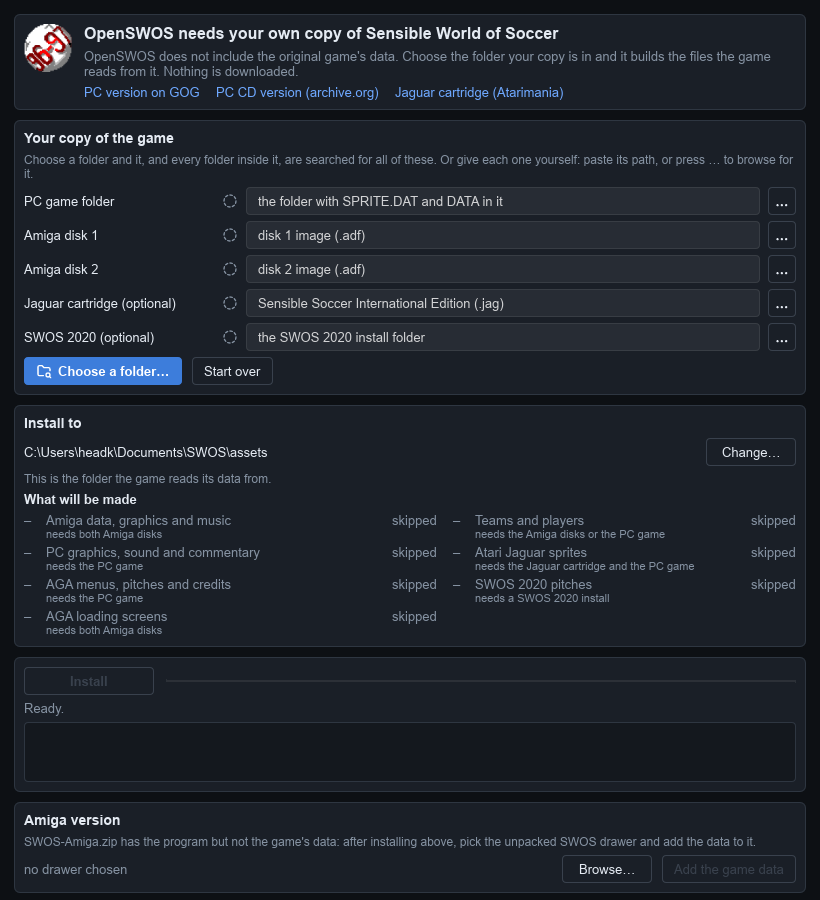
1. Click "Choose a folder…" and pick a folder your game is in. The setup
looks through that folder and every folder inside it, so you don't have to be
exact: choosing the folder that holds your GOG game, your .adf files, or both, is
enough.
Each part it finds gets a green tick. Here it found the PC version and both Amiga disks:
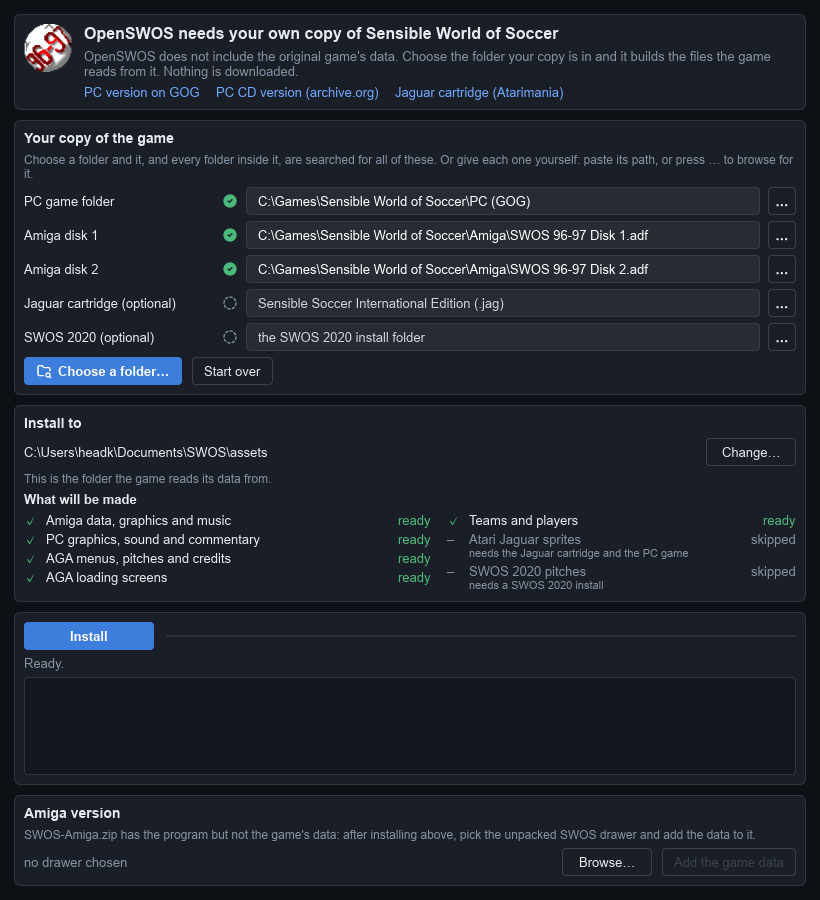
- Under What will be made, everything marked ready will be installed. Parts marked skipped need something you don't have; that's fine, the game plays without them.
- Something not found? Click the … button beside it and pick the file or folder yourself, or paste its path into the box.
- Install to is where the game reads its data from. Leave it as it is.
2. Click Install. It takes a few seconds. When it says Done, you're finished:
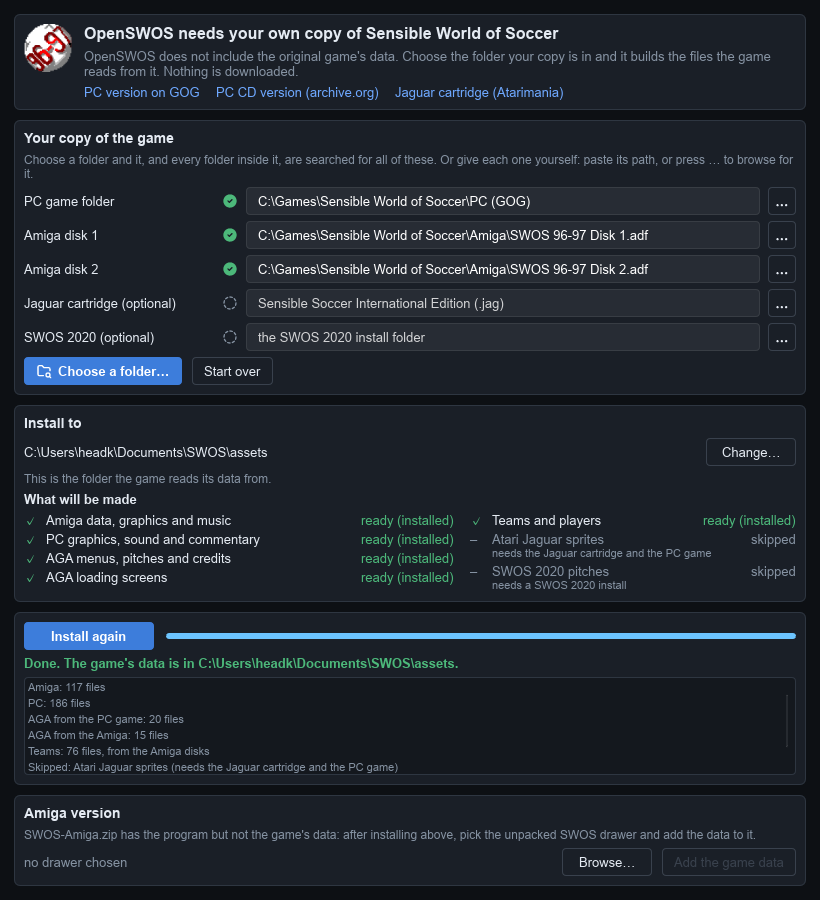
You only need to do this once. OpenSWOS Setup remembers where your copy of the game is. If a new version of OpenSWOS makes some of the data differently, the game tells you when it starts: open OpenSWOS Setup, where those parts say update needed, and click Update.
The screenshots are from Windows; the setup looks the same on a Mac and on Linux.
5Play
- Windows: start OpenSWOS from the Start menu (or the desktop, if you ticked that in the installer).
- Mac: open SWOS.app (right-click → Open the first time).
- Linux: run
SWOS.x86_64(or the one for your Pi) from the folder you unzipped. - Amiga: double-click SWOS in its drawer.
Menus use the arrow keys and Enter (or a gamepad). In a match, the arrow keys move and Ctrl, Space or Enter kick. All the keys and the gamepad buttons are in the controls guide.
Playing online: choose MULTIPLAYER on the main menu. Both players need the same version of OpenSWOS.
If something goes wrong
The setup doesn't find my game.
Click the … beside the missing part and pick it by hand:
- PC game folder: the folder with
SPRITE.DATand aDATAfolder in it. GOG puts it where you chose when installing, usually underC:\GOG Gamesor underGOG Galaxy\Gamesin Program Files. - Amiga disk 1 / 2: the
.adffiles themselves.
The game won't start, or starts without graphics or sound.
The game data usually isn't installed. Run OpenSWOS Setup again and check it says
Done. The game writes what happened to SWOS.log, in the folder below.
Windows or the Mac won't let me open it.
OpenSWOS isn't signed. On Windows click More info → Run anyway; on a Mac right-click the app and choose Open.
My gamepad doesn't work.
See Gamepad not detected? in the controls guide.
Where are my saves and settings?
| Computer | Folder |
|---|---|
| Windows | Documents\SWOS |
| Mac | ~/Library/Application Support/SWOS (in Finder: Go → Go to Folder…) |
| Linux | ~/.swos |
| Amiga | the save folder inside the SWOS drawer |
Saves are in save, the settings in SWOS.ini
(settings guide),
the game data from the setup in assets. Reinstalling or updating OpenSWOS never
touches them.
Still stuck?
Ask on the OpenSWOS page on itch.io, and
include what your SWOS.log says.